Panth Softech Team
Cloud adoption has evolved beyond choosing a single provider for every application and workload. Enterprises increasingly operate across different cloud environments to access specialized capabilities, support geographic requirements, improve resilience, and align individual workloads with the infrastructure best suited to them. A Multi-Cloud Strategy provides a structured approach to using services from multiple cloud providers rather than depending entirely on one platform.
A multi-cloud environment can involve providers such as AWS, Microsoft Azure, and Google Cloud, with different applications, data platforms, or workloads deployed according to specific business and technical requirements. The objective is not simply to use more clouds, but to determine where each workload can deliver the best combination of performance, availability, security, compliance, and business value.
In this guide, we’ll explore the benefits and risks of a multi-cloud approach, explain Multi-Cloud Architecture, compare multi-cloud with hybrid cloud, and discuss practical Multi-Cloud Best Practices for building a scalable enterprise cloud environment.
What Is a Multi-Cloud Strategy?
A Multi-Cloud Strategy is an approach in which an organization uses cloud services from two or more cloud providers to support its applications, data, infrastructure, or business operations.
For example, an enterprise might use:
- AWS for selected application workloads
- Microsoft Azure for enterprise applications and identity services
- Google Cloud for specific data analytics or machine learning workloads
The exact combination depends on the organization’s requirements. Multi-cloud does not mean that every application must run across every provider. Instead, businesses can select the most appropriate environment for individual workloads.
How Does Multi-Cloud Computing Work?
A typical multi-cloud environment can be represented as:
Business Requirements → Workload Assessment → Cloud Provider Selection → Deployment → Centralized Governance → Monitoring & Optimization
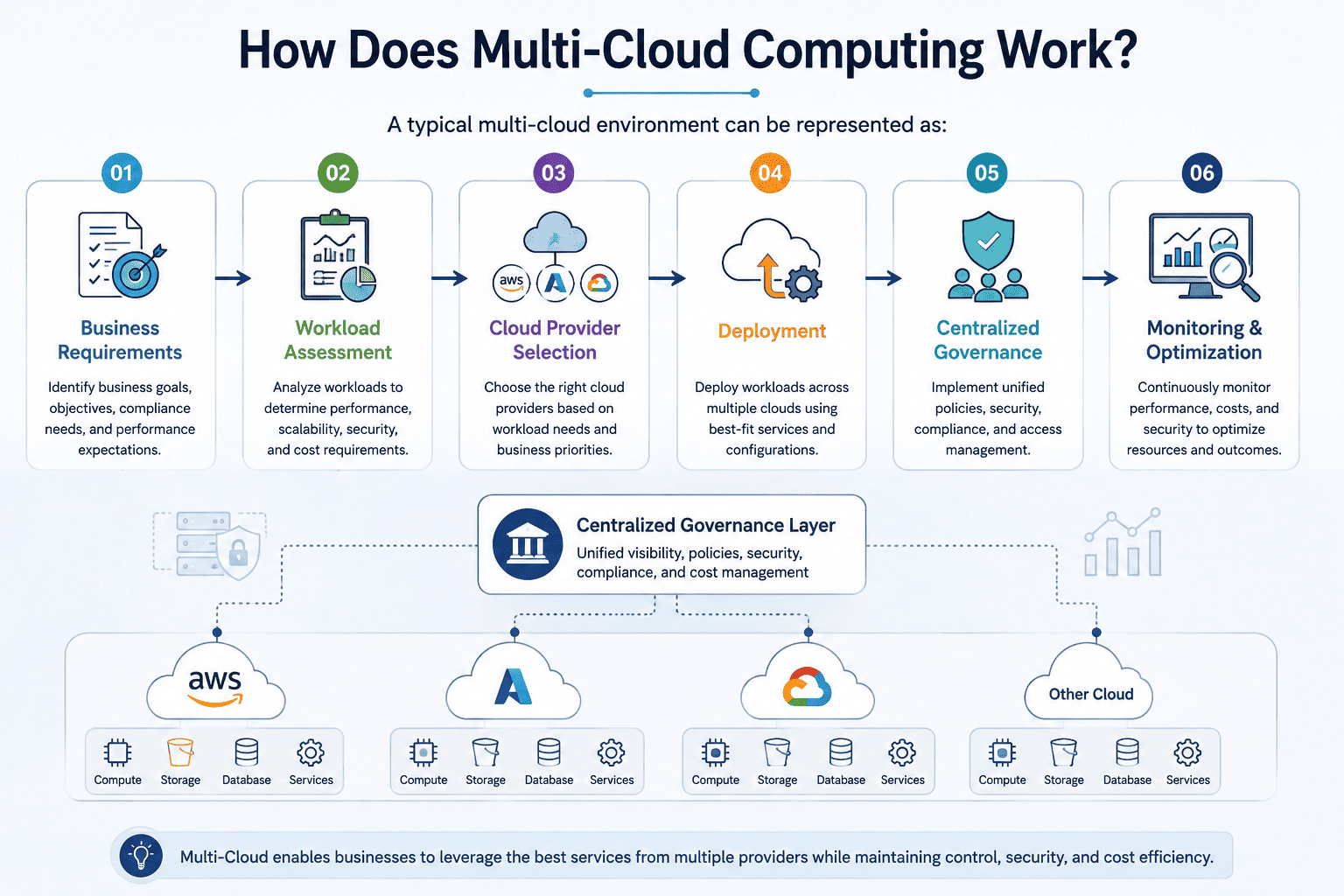
First, organizations identify their business and technical requirements. They then assess individual workloads and determine which cloud environment is most appropriate.
Once workloads are deployed, organizations need consistent processes for identity management, security, monitoring, networking, cost management, and compliance across the different environments.
For larger enterprises, technologies such as containers, Kubernetes, APIs, Infrastructure as Code, and automation can help create more consistent deployment and management processes across clouds.
Multi-Cloud vs Hybrid Cloud: What’s the Difference?
Multi-cloud and hybrid cloud are often used interchangeably, but they describe different architectural concepts.
A multi-cloud environment generally uses services from two or more public cloud providers. A hybrid cloud, on the other hand, combines public cloud resources with private cloud or on-premises infrastructure. An organization can also have a hybrid-and-multicloud architecture when it combines multiple public clouds with private or on-premises environments.
| Comparison Area | Multi-Cloud | Hybrid Cloud |
| Definition | Uses services from multiple cloud providers. | Combines public cloud with private cloud or on-premises infrastructure. |
| Primary Goal | Select different cloud environments based on workload requirements, capabilities, resilience, or business needs. | Combine existing private/on-premises infrastructure with public cloud capabilities. |
| Typical Architecture | AWS + Azure + Google Cloud, for example. | On-premises/private cloud + public cloud. |
| Common Drivers | Workload optimization, provider flexibility, geographic requirements, resilience, and specialized cloud capabilities. | Modernization, regulatory requirements, existing infrastructure investments, and workload portability. |
The two approaches can overlap. For example, an enterprise could maintain on-premises infrastructure while also using AWS and Azure, creating a hybrid and multi-cloud environment.
Benefits of a Multi-Cloud Strategy
A well-designed Multi-Cloud Strategy can provide enterprises with greater flexibility, resilience, and control over how workloads are deployed and managed. However, these benefits are realized only when organizations have clear workload-placement criteria, consistent governance, and strong operational processes.
- Reduced Vendor Dependency
- Improved Business Resilience
- Workload Optimization
- Greater Access to Cloud Innovation
- Geographic Flexibility
- Better Alignment Between Cost and Performance
- Improved Business Continuity & Disaster Recovery
7 Risks and Challenges of a Multi-Cloud Strategy
Although Multi-Cloud Solutions can provide significant strategic benefits, they also introduce additional technical and operational complexity. Enterprises should understand these challenges before expanding across multiple providers.
-
Increased Management Complexity
-
Security & Identity Management
-
Data Integration & Interoperability
-
Higher Operational Costs
-
Skills & Talent Requirements
-
Performance & Latency Issues
-
Governance & Compliance Complexity
How to Build a Multi-Cloud Strategy
Building a successful multi-cloud environment requires more than selecting two or three cloud providers. Enterprises should begin with business objectives and progressively design the architecture, governance, and operating model around those objectives.
Step 1: Define Business Objectives
Start by identifying why your organization needs multiple cloud providers.
Possible objectives include:
- Improving resilience
- Supporting global operations
- Accessing specialized services
- Meeting regulatory requirements
- Optimizing workloads
- Modernizing applications
- Reducing strategic dependency
A clearly defined objective provides a foundation for every subsequent architectural decision.
Step 2: Assess Existing Infrastructure
Before moving workloads, evaluate the current technology environment.
Assess:
- Applications
- Databases
- Data
- Infrastructure
- Network dependencies
- Security requirements
- Existing cloud contracts
- Operational capabilities
This assessment helps identify which workloads are suitable for migration or distribution across multiple cloud environments.
Step 3: Classify Workloads
Not every application belongs in a multi-cloud environment.
Classify workloads based on:
- Business criticality
- Performance requirements
- Data sensitivity
- Compliance
- Dependencies
- Availability requirements
- Cost
- Cloud-native requirements
This helps determine which workloads should remain together and which can be distributed.
Step 4: Select Cloud Providers
Choose cloud providers based on workload requirements rather than popularity.
Evaluate:
- Services
- Performance
- Pricing
- Security
- Compliance
- Geographic availability
- Existing expertise
- Integration capabilities
The goal is to create a strategic provider portfolio rather than simply adding more platforms.
Step 5: Design the Multi-Cloud Architecture
Define the technical architecture before large-scale deployment.
This should cover:
- Cloud networking
- Identity
- Security
- Data architecture
- Application architecture
- Integration
- Monitoring
- Disaster recovery
- Governance
Architecture should also consider how workloads communicate across cloud boundaries.
Step 6: Establish Governance
Define organization-wide policies for:
- Identity
- Security
- Compliance
- Data management
- Resource provisioning
- Cost management
- Monitoring
- Disaster recovery
Governance should provide consistency without unnecessarily restricting development teams.
Step 7: Implement Monitoring & FinOps
A multi-cloud strategy requires continuous visibility into both technical and financial performance.
Monitor:
- Resource utilization
- Application performance
- Availability
- Security events
- Cloud spending
- Data transfer
- Infrastructure capacity
FinOps practices can help organizations connect cloud spending with business value and improve cost accountability.
Step 8: Continuously Optimize
Cloud environments are not static.
Providers introduce new services, pricing changes, applications evolve, and business requirements shift.
Regularly review:
- Workload placement
- Performance
- Costs
- Security
- Availability
- Provider capabilities
- Business requirements
This allows the multi-cloud strategy to evolve rather than becoming a fixed architecture that becomes difficult to change.
Multi-Cloud Best Practices
A successful multi-cloud implementation requires disciplined architecture and operational management.
1. Start With Business Requirements
Don’t adopt multiple cloud providers simply because the technology is available. Establish a clear business justification first.
2. Avoid Multi-Cloud for the Sake of Multi-Cloud
If one cloud provider already meets your requirements effectively, adding another provider may introduce unnecessary complexity.
3. Standardize Where Practical
Create common standards for security, identity, monitoring, deployment, and governance wherever possible.
4. Design for Portability Where It Matters
Containers, APIs, Kubernetes, and Infrastructure as Code can improve portability for suitable workloads.
However, forcing every application to be portable can prevent organizations from taking advantage of valuable cloud-native capabilities.
5. Establish Centralized Governance
Use consistent policies for security, compliance, identity, resource management, and cost controls.
6. Implement FinOps
Track cloud spending across providers and connect infrastructure costs with business outcomes.
7. Build Strong Observability
Centralize metrics, logs, alerts, and performance information where practical to improve operational visibility.
8. Automate Infrastructure Management
Infrastructure as Code and automated deployment pipelines help reduce configuration inconsistencies and manual errors.
9. Test Disaster Recovery
Don’t assume that using multiple cloud providers automatically provides disaster recovery. Test recovery procedures, dependencies, data replication, and application failover.
10. Continuously Review Workload Placement
Regularly assess whether workloads remain in the most appropriate cloud environment based on cost, performance, security, availability, and business requirements.
Build a Smarter Multi-Cloud Strategy with Panth Softech
Managing multiple cloud environments requires more than connecting AWS, Azure, or Google Cloud. Enterprises need a clear strategy for workload placement, architecture, security, governance, data, monitoring, and ongoing optimization.
Panth Softech helps enterprises design and implement multi-cloud environments aligned with their business objectives. Our cloud specialists combine cloud architecture, migration, application modernization, infrastructure management, data engineering, and cloud-native development capabilities to help organizations build scalable and resilient cloud ecosystems.
Our Cloud Capabilities
- Multi-Cloud Strategy & Consulting
- Cloud Architecture & Design
- Cloud Migration Services
- Cloud Modernization
- Cloud Infrastructure Management
- Cloud-Native Application Development
- Cloud Data Engineering
- Hybrid Cloud Solutions
- Cloud Security & Governance
- Cloud Cost Optimization
Planning a Multi-Cloud Strategy for Your Enterprise?
Don’t add another cloud without a strategy.
Let Panth Softech evaluate your workloads, dependencies, business objectives, and existing infrastructure to develop a secure, scalable, and cost-conscious multi-cloud architecture built around your actual requirements.
Frequently Asked Questions
Q1. What is the difference between multi-cloud and hybrid cloud?
Multi-cloud generally refers to using two or more cloud providers, while hybrid cloud combines public cloud environments with private cloud or on-premises infrastructure. An organization can use both approaches simultaneously.
Q2. Is multi-cloud better than single cloud?
Neither approach is universally better. Multi-cloud can be beneficial when an organization has clear requirements for multiple providers, specialized services, geographic flexibility, or resilience. A single-cloud approach may be more appropriate when one provider adequately meets the organization’s requirements and simplicity is a priority.
Q3. How do enterprises manage multiple cloud providers?
Enterprises typically use centralized governance, identity management, monitoring, security policies, Infrastructure as Code, automation, cloud management platforms, and FinOps practices to manage multiple environments consistently.
Q4. How does multi-cloud help reduce vendor lock-in?
Using multiple providers can reduce reliance on one provider for selected workloads. However, complete elimination of vendor lock-in is difficult because applications may depend on proprietary cloud services. Portability should therefore be designed selectively based on business priorities.
Q5. Is multi-cloud more expensive?
It can be. Multiple environments can introduce additional costs for infrastructure management, networking, data transfer, monitoring, security, skills, and operations. Multi-cloud should therefore be adopted only when the expected business and technical benefits justify those additional costs.
Q6. What technologies are used in multi-cloud environments?
Common technologies include Kubernetes, containers, Infrastructure as Code, APIs, CI/CD platforms, cloud networking, identity federation, centralized monitoring, security platforms, and automation tools. The appropriate technology stack depends on the organization’s architecture and workload requirements.
Q7. When should a business adopt a multi-cloud strategy?
A business should consider multi-cloud when there is a clear requirement for multiple providers, such as specialized workloads, geographic or regulatory requirements, resilience objectives, existing investments, or specific cloud capabilities. Organizations should first evaluate whether the benefits outweigh the additional complexity.